Support portal for commercial AV

A slick support portal built for commercial AV businesses.

The Freaque Systems Support Portal gives your customers a polished way to raise and track support requests from Android, iPhone, tablet or desktop while giving your admin team better structure behind the scenes.

It is purpose-built for commercial AV workflows, with approved sites, equipment locations, device/equipment lists, ticket tracking, admin-side notes and status updates, and a more professional client experience.
Web app accessApproved sitesEquipment locationsDevice & equipment listsAdmin dashboardReal-time tracking

Core features

Everything needed for a cleaner AV support workflow.

This portal is designed to feel premium on the front end while providing a structured admin workflow behind the scenes.

Customer web app

Raise and track tickets from Android, iPhone, tablet or desktop with a professional branded experience.

Approved sites

Let customers choose from verified site names only so support requests stay clean and consistent.

Equipment locations

Organise support by room, level, training area, rack room or any named location inside the site.

Device & equipment lists

Associate devices with each location so customers can identify the actual display, DSP, microphone, camera or controller.

Admin-side ticket handling

Review tickets, filter by site and status, add notes, update status and keep the client informed.

Real-time visibility

Both the customer and the admin side stay connected with transparent progress updates.

Customer side

Simple for the client.

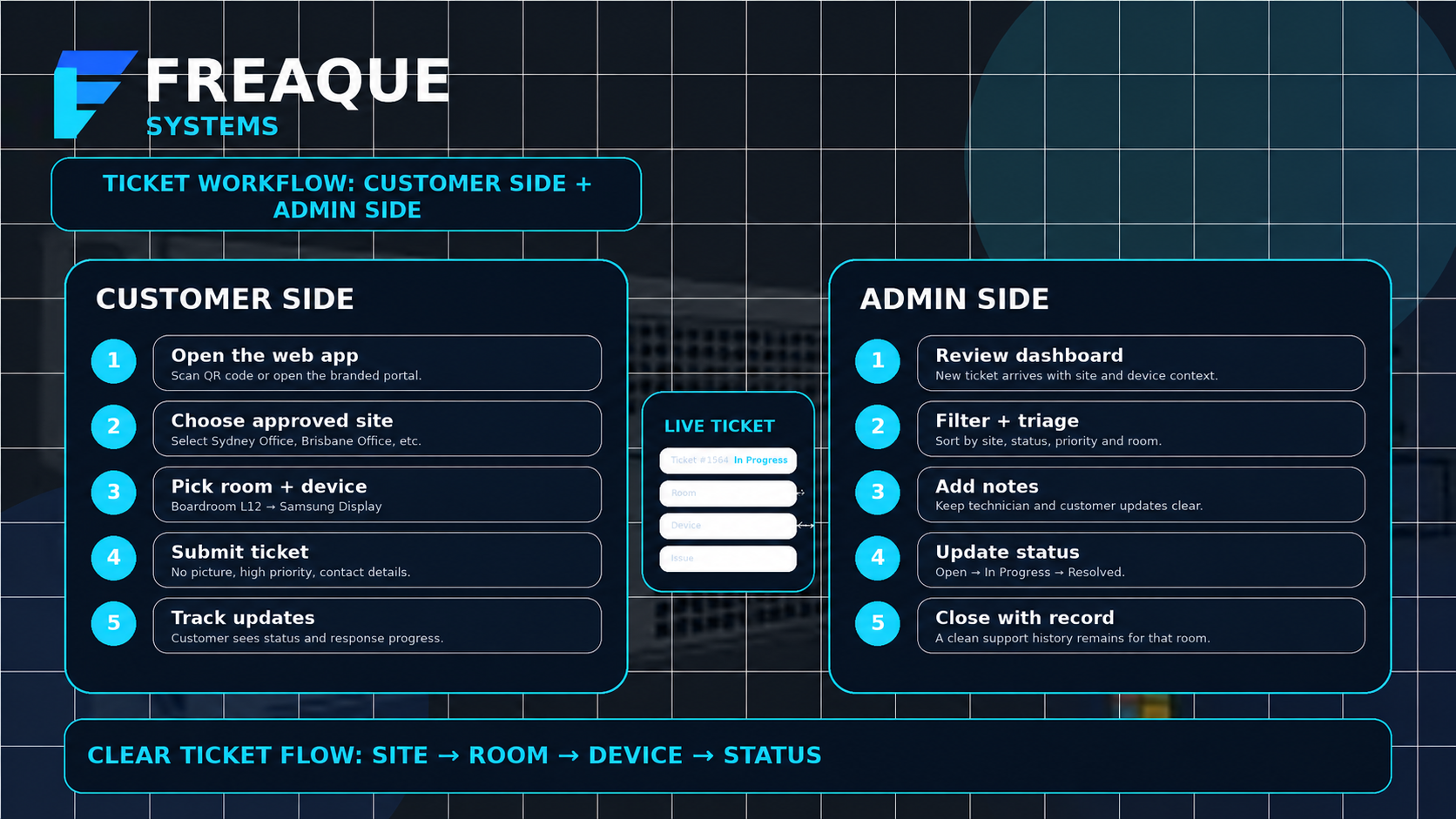
Clients open the portal or scan a QR code, select their approved site, choose the equipment location and device, then submit a ticket and track updates.

  • Mobile-friendly web app
  • Cleaner ticket detail from the start
  • Easy status visibility and communication

Admin side

Powerful for the admin team.

Admins can review incoming tickets, filter by site and status, manage notes, update the workflow and respond professionally without exposing any owner-side management.

  • Ticket dashboard and filtering
  • Notes, updates and client notifications
  • Admin settings and operational control
How the Freaque Systems support portal works across customer side and admin side
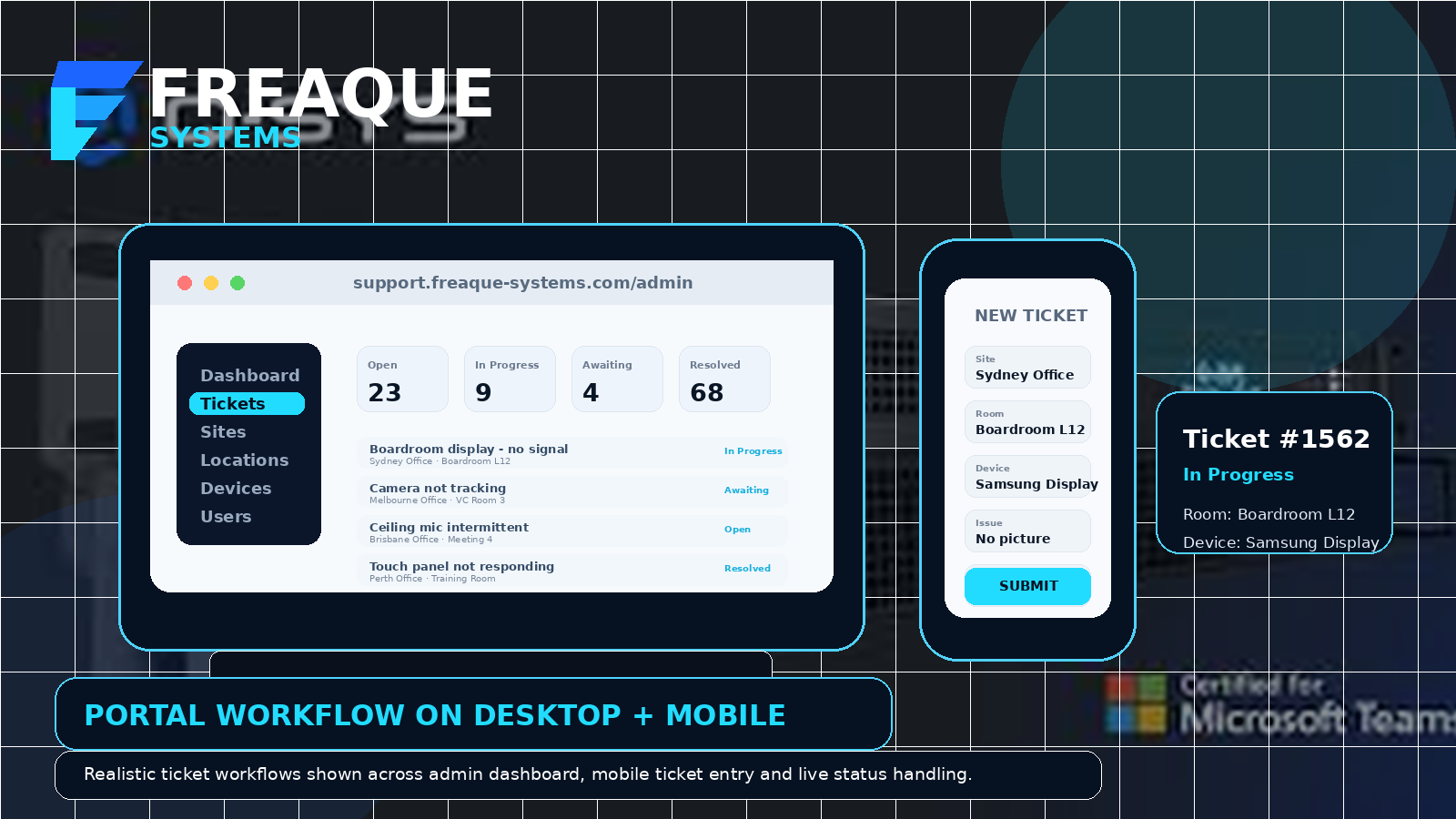
Desktop and mobile views of the Freaque Systems support portal workflow

Possible subscription tiers

Flexible subscription options for different business needs.

These are example tiers only and can be tailored to suit your support model, number of sites and required workflow depth.

Possible tier

Starter

Ideal for businesses that want a polished branded support portal without unnecessary complexity.

  • Branded portal access
  • Customer ticket creation and tracking
  • Basic admin dashboard
  • Status updates and notes
Possible tier

Professional

Well suited to commercial AV teams supporting multiple sites, rooms and devices.

  • Everything in Starter
  • Approved sites
  • Equipment locations
  • Device / equipment lists
  • QR access for client spaces
Possible tier

Enterprise

Best for larger or more tailored deployments that need deeper configuration and rollout support.

  • Everything in Professional
  • Broader rollout support
  • Tailored workflow configuration
  • Expanded admin setup and onboarding
  • Custom support planning

Ask Freaque Systems about the best fit for your business, support load and client environment.

Next step

See the workflow in action.

Open the live portal, explore how it works, or talk through the right setup for your commercial AV support model.